Get-SystemStatus
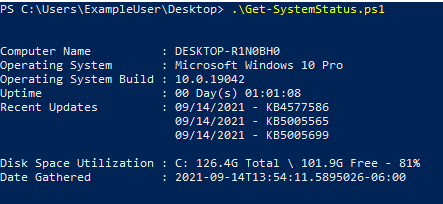
Gathers the follow information from a provided list of computers.
The collected data is then returned as a DataTable or can be exported to a variety of file formats.
Optional Metadata can be included to be included in the returned results/reports to assist in machine identification.
Collected Data: Computer Name, Operating System, Operating System Build, Uptime, Recent Updates, Disk Space Utilization, Date Gathered
Optional Metadata: Organization, Role, UpdateWindow
Variables
ComputerName Set
| Variable |
Required |
Default |
Choices |
Description |
| ComputerName |
Yes |
|
|
Specifies a computer or set of computers that should be queried for their status |
CsvPath Set
| Variable |
Required |
Default |
Choices |
Description |
| CsvPath |
Yes |
|
|
Specifies a computer or set of computers that should be queried for their status |
Credential Set
| Variable |
Required |
Default |
Choices |
Description |
| Credential |
Yes |
|
|
Credentials used for connecting to the specified computers to gather the machine's status information |
CredentialPath Set
| Variable |
Required |
Default |
Choices |
Description |
| CredentialPath |
Yes |
|
|
Path to stored credentials that will be imported using Import-Clixml to allow for storing credentials using a secure method |
Report Set
| Variable |
Required |
Default |
Choices |
Description |
| OutputType |
No |
JSON |
CSV, JSON, HTML |
Style of report that should be output |
| OutputPath |
Yes |
|
|
Path to where the report should be saved |
Common Variables
| Variable |
Required |
Default |
Choices |
Description |
| Organization |
No |
|
|
Optional metadata that can be included in the returned results |
| Role |
No |
|
|
Optional metadata that can be included in the returned results |
| UpdateWindow |
No |
|
|
Optional metadata that can be included in the returned results |
Syntax
Get-SystemStatus.ps1 [-Organization <String>] [-Role <String>] [-UpdateWindow <String>] [<CommonParameters>]
Get-SystemStatus.ps1 -ComputerName <String[]> -CredentialPath <String> [-OutputType <String>] -OutputPath <String> [-Organization <String>] [-Role <String>] [-UpdateWindow <String>] [<CommonParameters>]
Get-SystemStatus.ps1 -ComputerName <String[]> -CredentialPath <String> [-Organization <String>] [-Role <String>] [-UpdateWindow <String>] [<CommonParameters>]
Get-SystemStatus.ps1 -ComputerName <String[]> -Credential <PSCredential> [-OutputType <String>] -OutputPath <String> [-Organization <String>] [-Role <String>] [-UpdateWindow <String>] [<CommonParameters>]
Get-SystemStatus.ps1 -ComputerName <String[]> -Credential <PSCredential> [-Organization <String>] [-Role <String>] [-UpdateWindow <String>] [<CommonParameters>]
Get-SystemStatus.ps1 -ComputerName <String[]> [-OutputType <String>] -OutputPath <String> [-Organization <String>] [-Role <String>] [-UpdateWindow <String>] [<CommonParameters>]
Get-SystemStatus.ps1 -ComputerName <String[]> [-Organization <String>] [-Role <String>] [-UpdateWindow <String>] [<CommonParameters>]
Get-SystemStatus.ps1 -CsvPath <String> -CredentialPath <String> [-OutputType <String>] -OutputPath <String> [-Organization <String>] [-Role <String>] [-UpdateWindow <String>] [<CommonParameters>]
Get-SystemStatus.ps1 -CsvPath <String> -CredentialPath <String> [-Organization <String>] [-Role <String>] [-UpdateWindow <String>] [<CommonParameters>]
Get-SystemStatus.ps1 -CsvPath <String> -Credential <PSCredential> [-OutputType <String>] -OutputPath <String> [-Organization <String>] [-Role <String>] [-UpdateWindow <String>] [<CommonParameters>]
Get-SystemStatus.ps1 -CsvPath <String> -Credential <PSCredential> [-Organization <String>] [-Role <String>] [-UpdateWindow <String>] [<CommonParameters>]
Get-SystemStatus.ps1 -CsvPath <String> [-OutputType <String>] -OutputPath <String> [-Organization <String>] [-Role <String>] [-UpdateWindow <String>] [<CommonParameters>]
Get-SystemStatus.ps1 -CsvPath <String> [-Organization <String>] [-Role <String>] [-UpdateWindow <String>] [<CommonParameters>]
Get-SystemStatus.ps1 [-OutputType <String>] -OutputPath <String> [-Organization <String>] [-Role <String>] [-UpdateWindow <String>] [<CommonParameters>]
License
See LICENSE file for full license information.
Screenshots